
Tools & Tutorials
How to Analyze Your Airbnb Listing: Free Tool & Step-by-Step Guide
Learn how to analyze your Airbnb listing using Priceo's free tool at priceo.io/analyze. This step-by-step guide shows you how to get an AI-powered health check covering photos, title, description, amenities, reviews, and pricing strategy—all in under 2 minutes.
Whether you're a new host wondering why bookings are slow, or an experienced host looking to optimize, a systematic listing analysis reveals exactly where to focus your improvement efforts for maximum impact.
What is the Listing Analyzer?
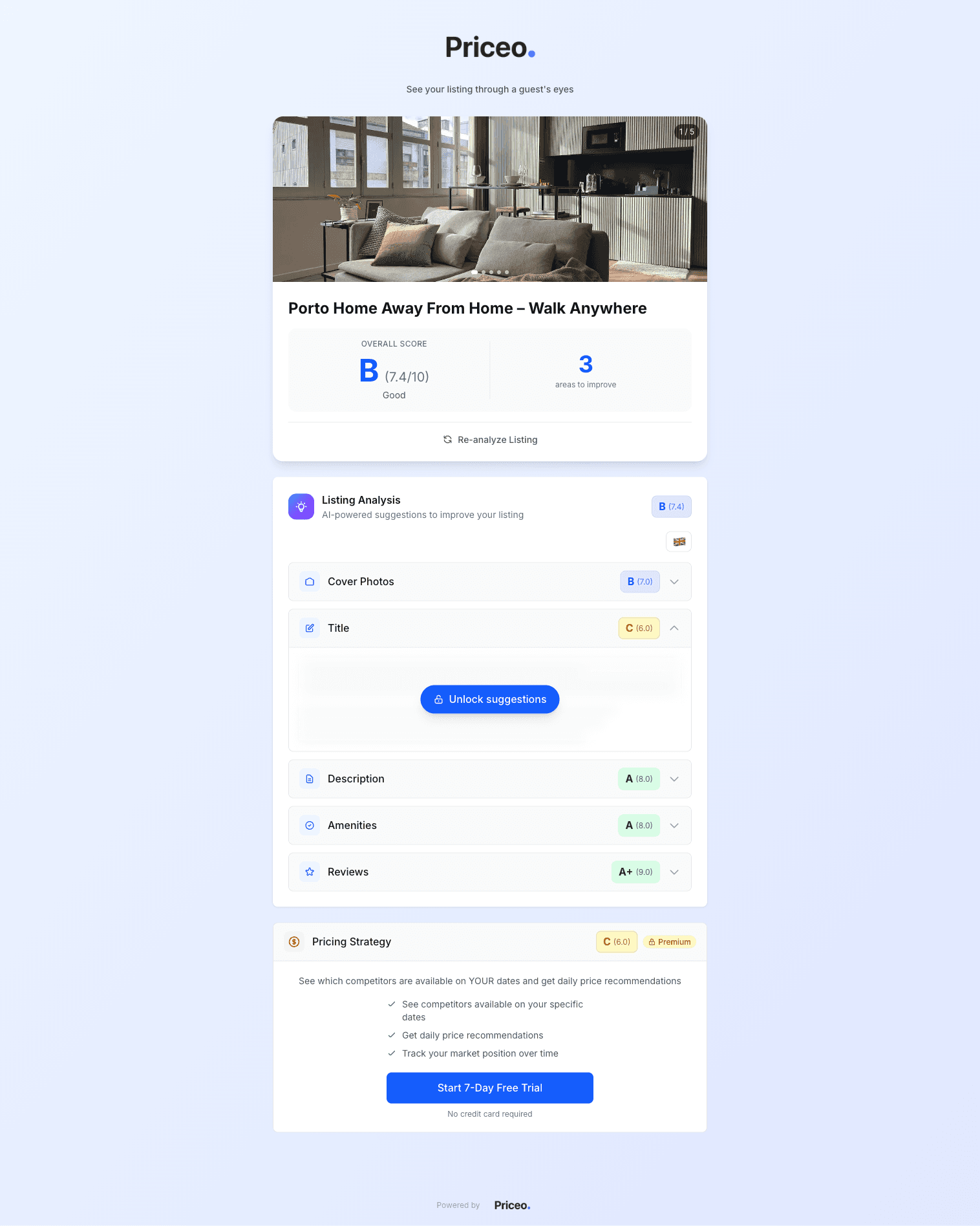
Priceo's free listing analyzer is an AI-powered tool that evaluates your Airbnb listing across 6 critical categories. Each category receives a grade from A+ to F, giving you a clear picture of your listing's strengths and weaknesses.
Photos
Quality, quantity, composition, lighting, and visual appeal
Title
Keywords, length, appeal, and search optimization
Description
Structure, benefits focus, readability, and completeness
Amenities
Completeness, high-value items, and guest expectations
Reviews
Overall score, recency, quantity, and response patterns
Pricing
Market positioning, competitiveness, and strategy
Three Numbers That Frame Listing Analysis
Anchor to these external numbers before you grade your own listing.
3%
Standard host service fee Airbnb deducts from each booking, per Airbnb's help center — the constant in every revenue-grade calculation. Source
90%
Minimum 365-day response rate Airbnb requires for Superhost — the single biggest listing-health bar most analyzers grade against. Source
4.8
Minimum overall guest rating required for Superhost — the rating threshold that turns "average" listings into top-quartile performers. Source
Step-by-Step Guide
Step 1: Navigate to priceo.io/analyze
Open your browser and go to priceo.io/analyze. The tool is completely free—no signup required to get your initial analysis.
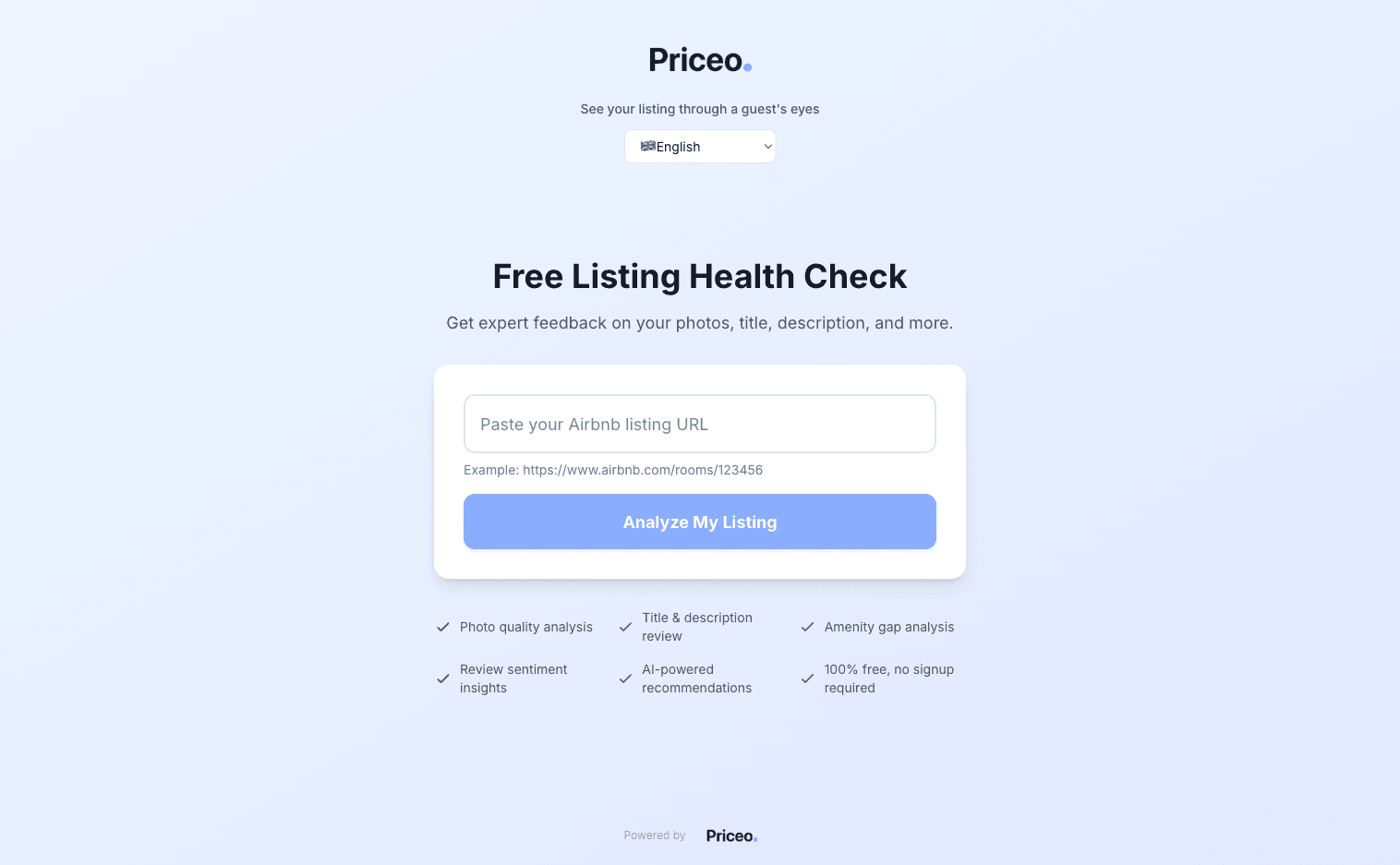
Step 2: Paste Your Airbnb Listing URL
Copy your Airbnb listing URL from your browser. It should look like: airbnb.com/rooms/123456789
Paste it into the input field and click “Analyze My Listing”.
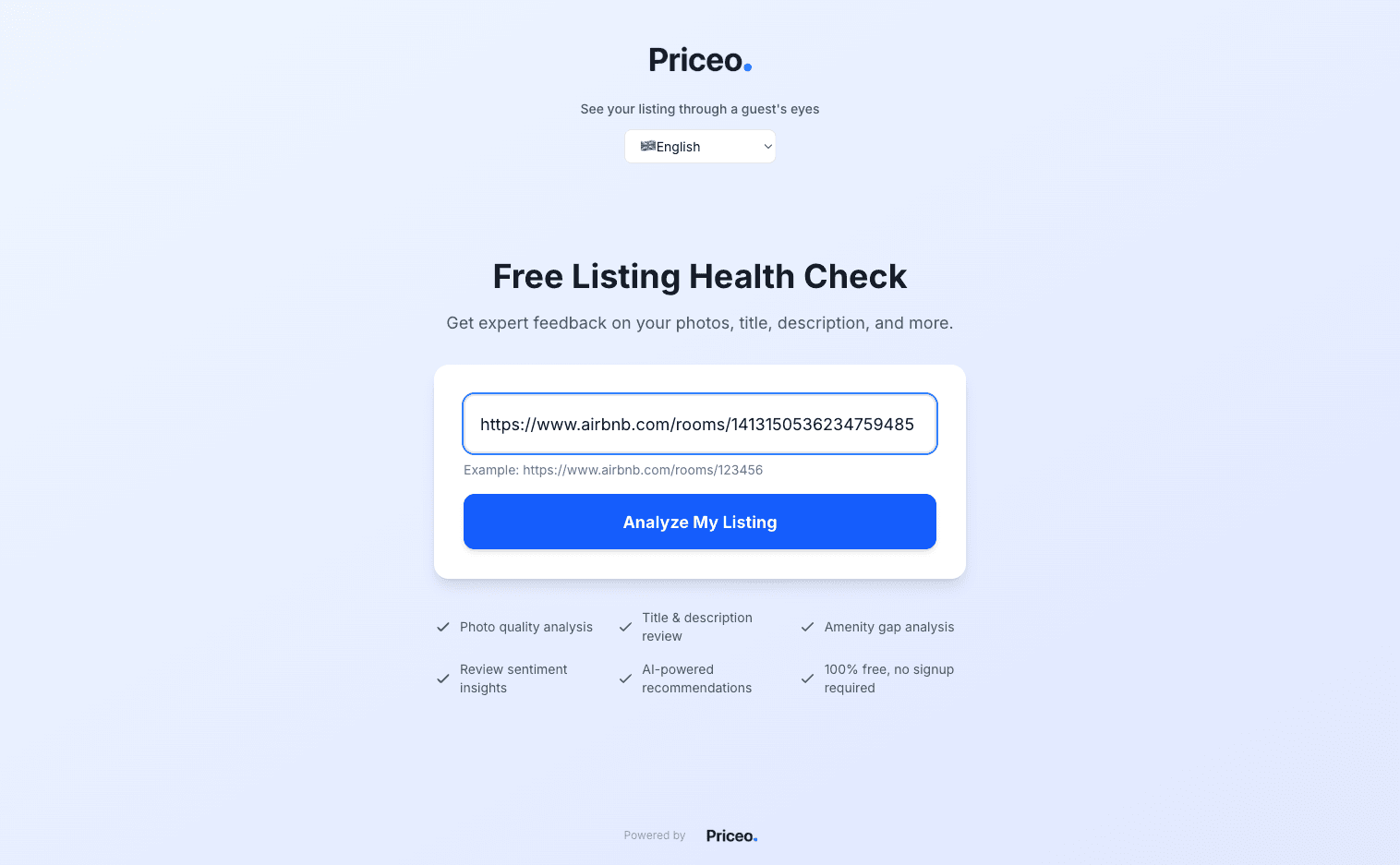
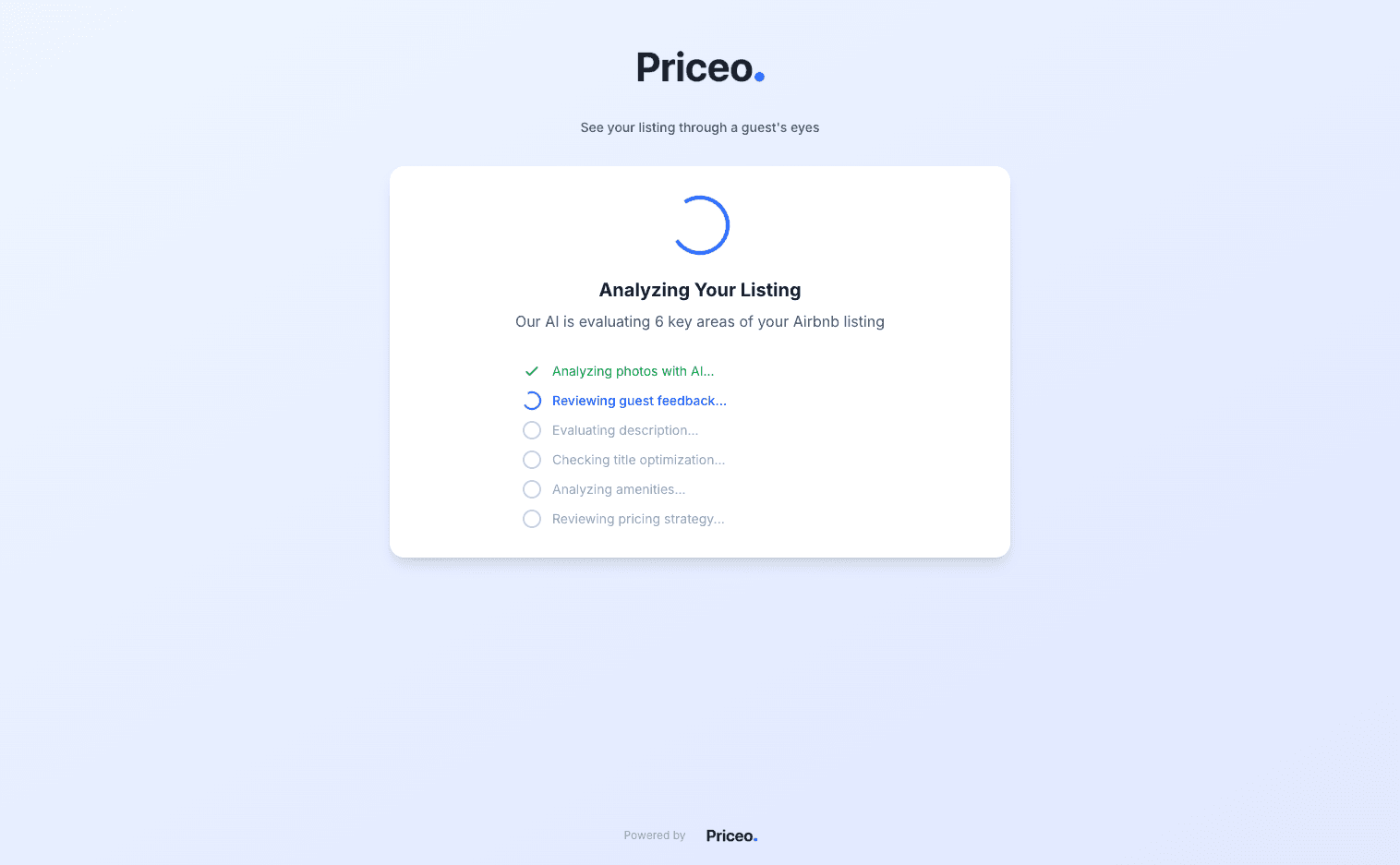
Step 3: Watch the Analysis Run
The AI will analyze your listing across all 6 categories. This typically takes 15-30 seconds. You'll see each category being checked in real-time.
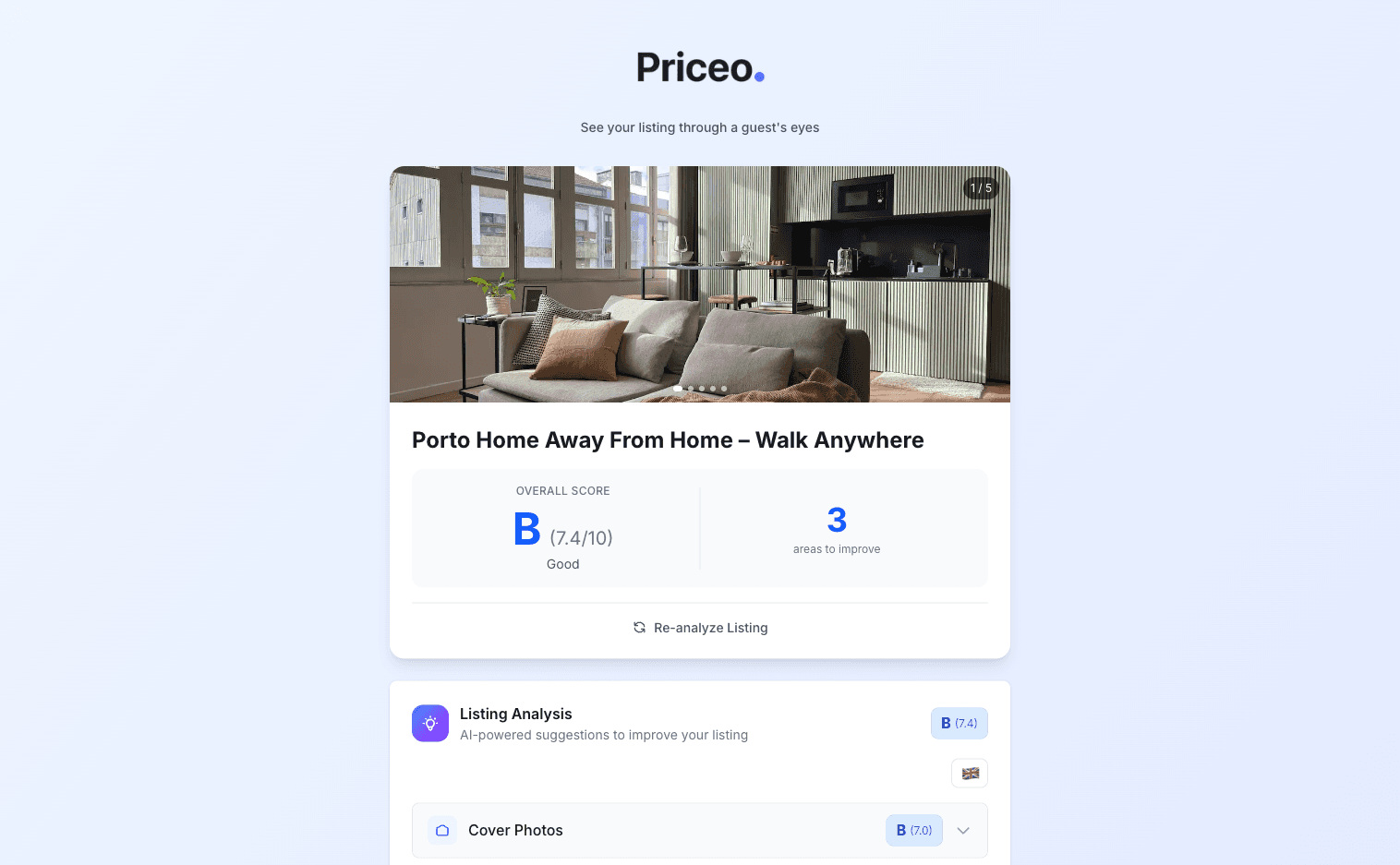
Step 4: Review Your Grades and Overall Score
Once complete, you'll see your overall score (0-100) and individual letter grades for each category. Categories with C or below grades should be your priority focus areas.
Step 5: Unlock Detailed Suggestions
Click on any category to expand detailed recommendations. The AI provides specific, actionable suggestions tailored to your listing. For pricing strategy insights, you can create a free account to see competitor data.
Understanding Your Results
Grade Scale
Excellent
Good
Needs Work
Poor
Critical
Priority Order
Not all categories have equal impact. Here's the recommended priority order for improvements:
- Photos — First impression, highest impact on click-through
- Reviews — Social proof, affects search ranking significantly
- Pricing — Directly affects visibility and booking rate
- Title — Search visibility and first-line appeal
- Amenities — Filter matching and guest expectations
- Description — Conversion after guest clicks through
Quick Wins by Category
📸 Photos
- ✓Aim for 20+ high-quality photos covering every room
- ✓Use natural light; shoot during “golden hour”
- ✓Include lifestyle shots (coffee on balcony, set dining table)
- ✓First photo should be your best—wide angle of main space
✏️ Title
- ✓Lead with your best feature (view, location, amenity)
- ✓Include neighborhood name for local searches
- ✓Mention standout amenities (pool, parking, workspace)
- ✓Keep under 50 characters for full visibility on mobile
⭐ Reviews
- ✓Respond to every review (shows engagement)
- ✓Address negative feedback professionally and promptly
- ✓Send a check-in message mid-stay to catch issues early
- ✓Target 4.8+ rating (algorithmic boost threshold)
Frequently Asked Questions
How do I optimize my Airbnb listing?
Start by analyzing your listing with a tool like Priceo's free analyzer. Focus on categories with lowest grades. The most impactful improvements are typically: professional-quality photos (20+), a keyword-optimized title, competitive pricing, and maintaining a 4.8+ review score.
Is 4.8 a good Airbnb rating?
Yes, 4.8 is excellent. Listings with 4.8+ ratings receive a meaningful search ranking boost from Airbnb's algorithm. Below 4.5, listings may be actively suppressed in search results. Maintaining 4.8+ should be a priority.
How do I boost my Airbnb algorithm ranking?
Key factors include: competitive pricing (most controllable), fast response rate (under 1 hour), high acceptance rate, Instant Book enabled, updated calendar, strong reviews (4.8+), quality photos, and complete listing details. Price competitively to get booked—bookings create a positive feedback loop.
Is the listing analyzer really free?
Yes, the basic analysis is completely free with no signup required. You get grades and recommendations for all 6 categories. For detailed pricing strategy and competitor analysis, you can create a free account to access additional features.
Stop guessing your Airbnb price
Get a free analysis in 60 seconds
Paste your Airbnb URL. Priceo shows you what your competitors charge tonight, your listing health score, and the 3 things to fix first.
Analyze my listingLaunching in Porto first
Want Priceo to price your Airbnb for you? €0 to activate a property.
Automated pricing, no monthly fee. We take 3% of each booking we help you win — no subscription, no lock-in. Porto live today; other cities rolling out.
Join the waitlistRevenue share is invoiced after guests check in.
Written by

Adalberto Ferreira
Founder, Priceo — ex-VP Revenue Management, AvantStayFormer VP of Revenue Management at AvantStay, where I owned pricing for 2,300+ short-term rentals across 40+ US markets. I now build automated pricing for Airbnb hosts — analyzing millions of competitor data points across Portugal, Brazil, and Spain to help hosts price smarter, not lower.
Expertise
Related Guides
Airbnb Smart Pricing: How It Works & What to Do Instead
Learn why Airbnb Smart Pricing typically lowers your revenue by 15-30% and the manual competitor-based strategy that top hosts use instead.
Airbnb Pricing Strategy: How to Price, Position & Rank Higher
Master the 4 pricing strategies, learn how to research competitors, and understand the factors that affect your search position.
Porto Airbnb Market Report 2026: Live Pricing Data
Live Porto Airbnb market data — nightly rates by neighborhood, price distribution, available inventory. Updated daily from the Priceo pipeline.